How to Upload a CSV for Enrichment
Last updated September 5, 2025
If you already have a list of contacts you want to enrich with emails and phone numbers, you can upload a CSV directly into Ciro.
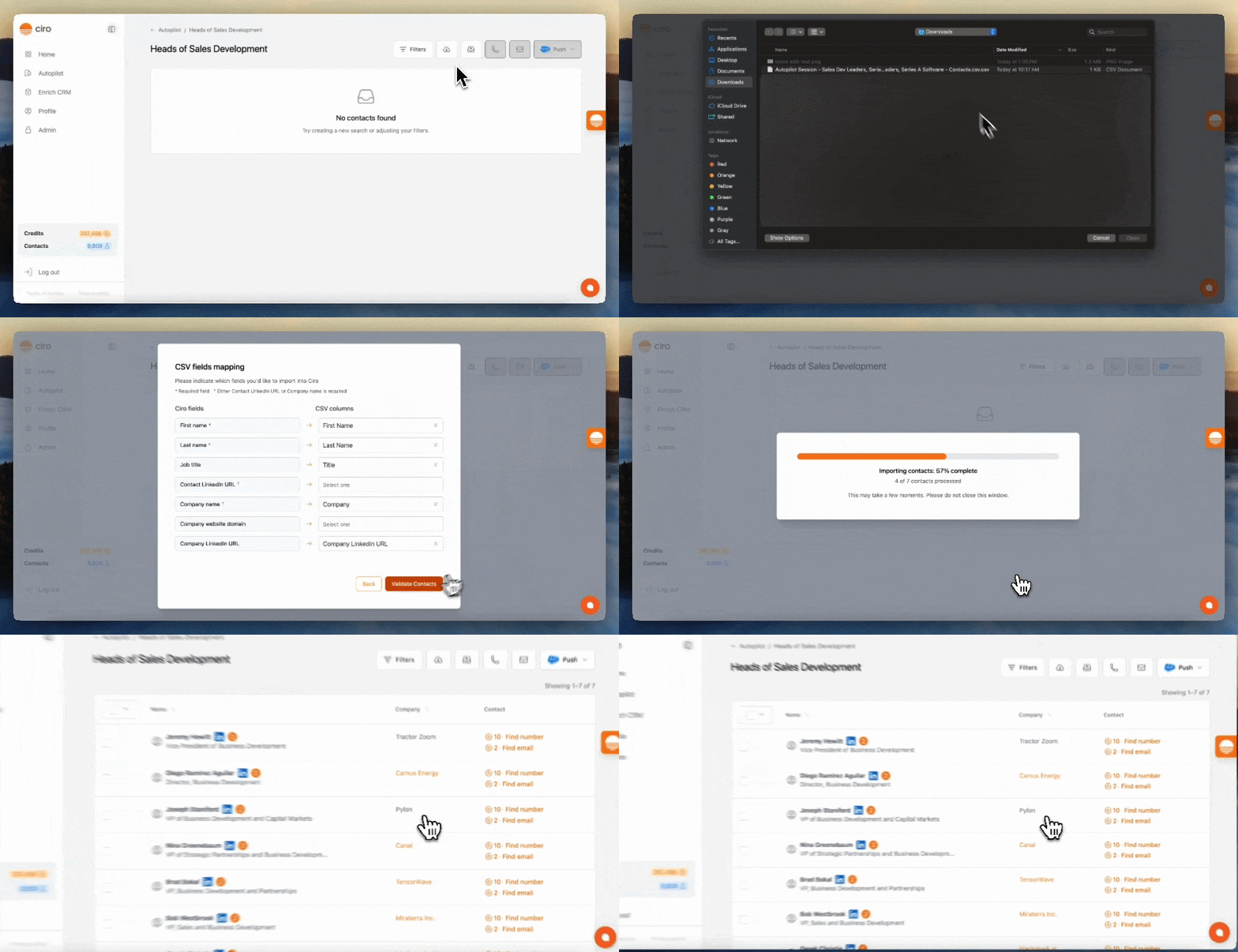
- Add your contacts to a list
- If you'd like to create a new list — go to Autopilot and click "+ New List"
- Alternatively, navigate to an existing list you'd like to add your contacts to
- Once you're in your list, click the “Import” icon in the top-right toolbar
- In your upload, make sure the CSV contains the prospect's first, last, and company name
- Click Validate Contacts, where Ciro will auto-map your columns
- Then, click Import Valid Rows
- Once imported, select the contacts you'd like to enrich
- Use the toolbar in the upper right to click the phone or email icons and enrich in bulk
- After enrichment, click Push in the upper-right toolbar to send contacts to your CRM
Learn more How to Push contacts to your CRM [link when live]
Need more help? Browse all guides in the Ciro Help Center [link when live]
Was this article helpful?