Trusted Sources
Last updated September 5, 2025
Ciro now gives you more context behind every contact — without the need to Google.
As you search, Ciro automatically scans trusted third-party sources like company websites, Crunchbase, and news outlets — so you can qualify faster and personalize smarter.
📍 Where to find it?
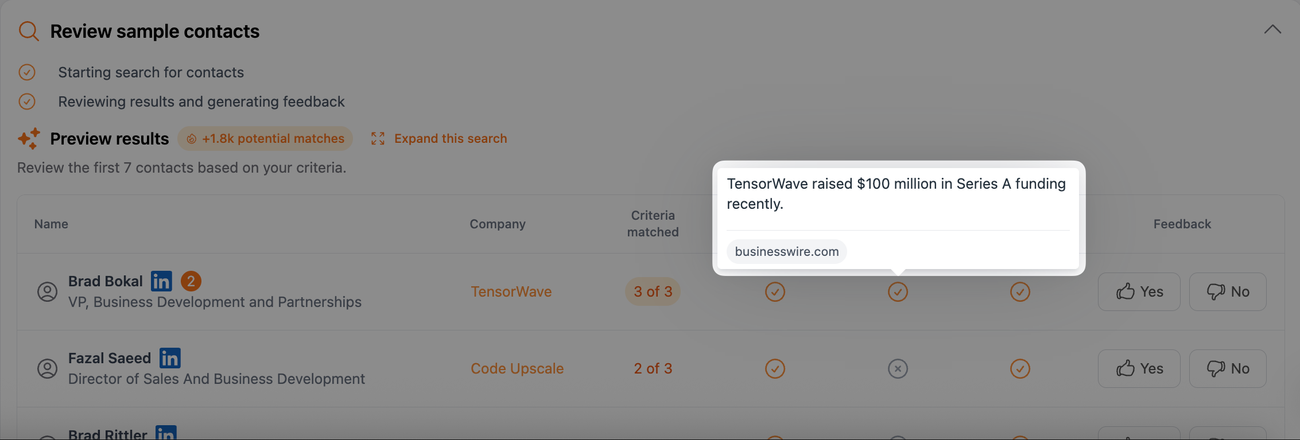
- Start a search in app.ciro.io
- As Ciro runs, it now checks these trusted sources in the background
- Insights are displayed alongside contact and company data
💡 What kind of insights does Ciro find? When reviewing companies, Ciro highlights: 🚀 Fundraising activity (from Crunchbase) 📰 Recent company news (from trusted sources) 🌐 Website updates — like new execs, product launches, and more
👉🏼 Why this matters Instead of bouncing between:
- Crunchbase
- Company websites
- Google News…
Ciro brings it all together, so you can:
- Confirm fit faster
- Prioritize better accounts
- Personalize with context that actually matters
🔍 When does Ciro use Trusted Sources?
- Every time you launch a search, Ciro uses AI to qualify companies and contacts
- As part of that qualification, it scans trusted sources for added signals
- These insights show up directly in the Preview — no extra work needed
👉 Ready to try it?
Log in to Ciro and run a search. Your insights will show up automatically.
Need more help? Browse all guides in the Ciro Help Center. [link when live]